Close Menu
    What's Hot

    Ways Protect Facebook Account From Unauthorized Access.

    August 18, 2023

    Phishing Attack Prevention: Techniques and Tips for Staying Safe Online

    January 28, 2023

    The Basics of Router Technology: 5GHz vs 2.4GHz

    January 25, 2023
    Facebook X (Twitter) Instagram
    Facebook X (Twitter) Instagram
    Prem Oli
    • Home
    • News
    • Content

      Ways Protect Facebook Account From Unauthorized Access.

      August 18, 2023

      Phishing Attack Prevention: Techniques and Tips for Staying Safe Online

      January 28, 2023

      The Basics of Router Technology: 5GHz vs 2.4GHz

      January 25, 2023

      5G Networks: The Next Generation of Cellular Technology

      January 24, 2023

      Different between iphone14 and iphone13. What is A14 Bionic processor ?

      September 13, 2022
    • Learn
    • Video
    • About Me
    Prem Oli
    Content

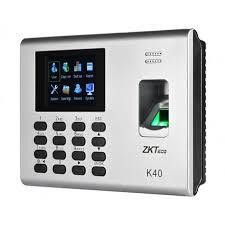
    User Manual ZKT K40/K14 Part 3

    Prem OliBy Prem OliMarch 25, 2019Updated:September 21, 2023No Comments1 Min Read
    Facebook Twitter Pinterest LinkedIn Tumblr WhatsApp Email
    Share
    Facebook Twitter LinkedIn WhatsApp Pinterest Email

    This content is about the user manual of ZKT K40/K14 digital attendance system.

    View Report of that Staff 

    Setting IP Address

    1. Press M/OK button for 2-3 seconds
    2. Press on System
    3. Press on
    4. Put Ip address according to your Network
    5. If you do not know your network ip then make DHCP ON
    6. Press on M/Ok button and restart the Device
    7. If Ip is shown, then make DHCP Off and click on M/OK, if the Ip is 0.0.0.0 then check your network.
    8. Press M/OK button to Save the DataDownload Attendance Logs in Pendrive

    Put USB pendrive in the device not more than 8 GB

    Press M/Ok Button for few Seconds

    Press Data Mgt.

    Press Download AttLog

    Then messege will be displayed successfully download, unplug Pendrive from device click on M/OK

    Similarly from here we can delete the Att log, delete all data, clear admin, here is the photo

    Share. Facebook Twitter Pinterest LinkedIn Tumblr WhatsApp Email
    Prem Oli
    • Website

    Related Posts

    Ways Protect Facebook Account From Unauthorized Access.

    August 18, 2023

    Phishing Attack Prevention: Techniques and Tips for Staying Safe Online

    January 28, 2023

    The Basics of Router Technology: 5GHz vs 2.4GHz

    January 25, 2023

    5G Networks: The Next Generation of Cellular Technology

    January 24, 2023

    Different between iphone14 and iphone13. What is A14 Bionic processor ?

    September 13, 2022

    iPhone 14 Pro and 14 Pro Max – Full Specifications

    September 10, 2022
    Add A Comment
    Leave A Reply Cancel Reply

    Our Picks

    Ways Protect Facebook Account From Unauthorized Access.

    August 18, 2023

    Phishing Attack Prevention: Techniques and Tips for Staying Safe Online

    January 28, 2023

    The Basics of Router Technology: 5GHz vs 2.4GHz

    January 25, 2023

    5G Networks: The Next Generation of Cellular Technology

    January 24, 2023
    About Us

    This blog isn't just about bits and bytes; it's a blend of technology, lifestyle, and everything in between. You can look forward to:
    Email Us: mail@premoli.com
    Contact: +977-9847903671

    Facebook X (Twitter) Instagram YouTube TikTok
    Our Picks

    Ways Protect Facebook Account From Unauthorized Access.

    August 18, 2023

    Phishing Attack Prevention: Techniques and Tips for Staying Safe Online

    January 28, 2023

    The Basics of Router Technology: 5GHz vs 2.4GHz

    January 25, 2023
    Facebook X (Twitter) Instagram Pinterest
    • Home
    • Buy Now
    © 2026 Prem Oli. Designed by Prem oli.

    Type above and press Enter to search. Press Esc to cancel.