

This content is about the user manual of ZKT K40/K14 digital attendance system.
Change Date and Time
- Press Button M/OK for 2-3 seconds
- Press System
- Press Date& time
- Put the Current date and time
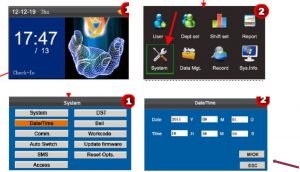
Press M/Ok ( Saving the Data
Adding New Users
- Press M/ok Button 2-3 Seconds
- Press Users Mgt
- Press Add Users
- Type Device Id: …..
- Type Name : ……
- Press on Enroll FP ( for Finger print Sample)
- Add Finger Three Times ( it should be Same finger)
- If need backup finger for same staff then Press Enroll FP
- Add another Finger three Times
- Press on Enroll PWD ( if Password is needed)
- Type password

- Re type password
- Press on OK
- Press on Enroll Card ( if Card needs to be shown)
- Show RFID Card
- Press M/OK
- Purview: Users ( this is Default for normal staff, if any staff need to block the admin section of device then put Administrator Instead of Users
- Press M/OK.
